Create a Likert Self-Assessment in Moodle
Lesson 1 — Create a Likert Rating Scale in Moodle with SelfProfile
Estimated time: 15 minutes
Learning Outcomes
By the end of this lesson you will be able to:
-
understand what SelfProfile is designed to do;
-
install the plugin;
-
import a ready-made instrument;
-
understand how JSON powers reusable instruments;
-
use AI to create your own instruments.
Section 1
What is SelfProfile?
SelfProfile is a Moodle activity for reflective learning. It is not a personality test. It is not a psychometric assessment. It is not a diagnostic instrument.
Instead, it helps learners reflect on themselves by responding to carefully written statements using a Likert scale. Because the instrument is completely teacher-authored, SelfProfile can be used for almost any low-stakes reflective activity, including:
-
leadership development
-
ministry placement
-
study skills
-
career exploration
-
professional development
-
onboarding
-
creator entrepreneurship
-
team roles
-
mentoring
The same plugin can therefore be reused in many completely different contexts.
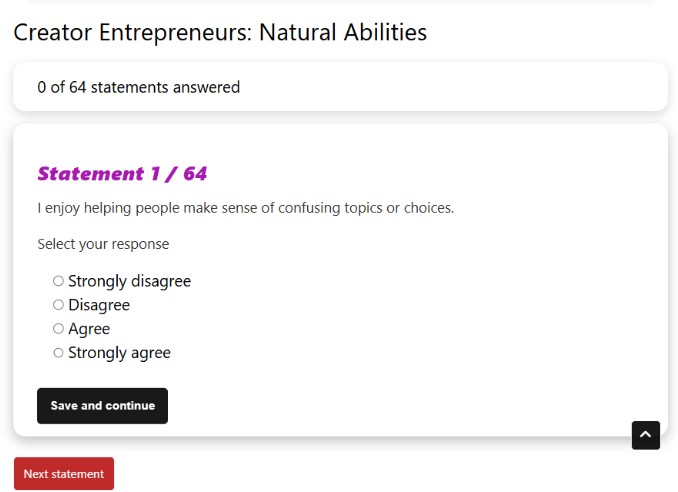
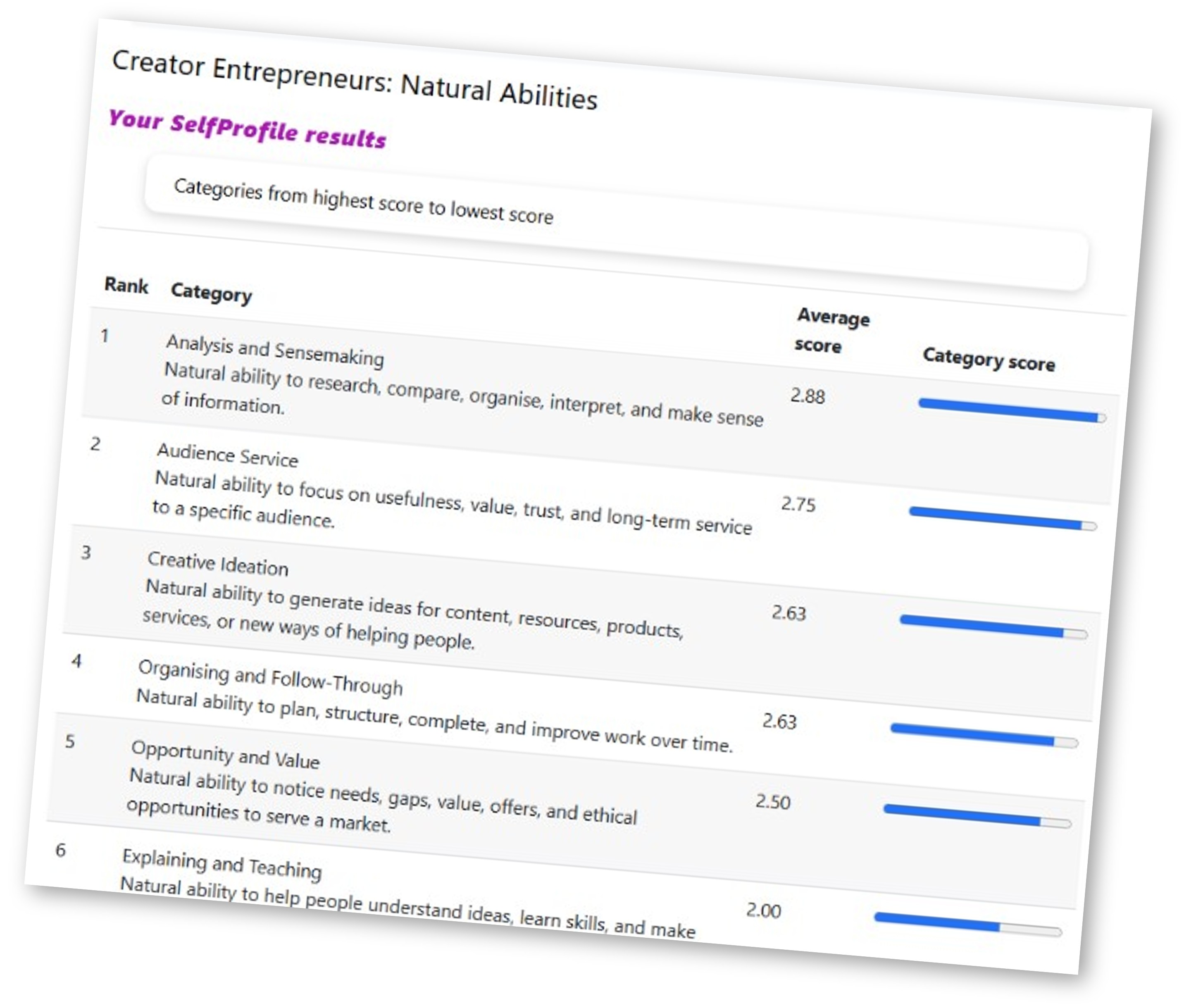
Students answer one statement at a time and receive a category-based summary when they finish.
Section 2
Installing SelfProfile
There are two ways to obtain the plugin.
Option 1
Download the latest release from Moodle.org.
Option 2
Download the ZIP package from the Resources section of this course.
The Resources section also contains
-
README
-
sample JSON instruments
-
demonstration PDFs
-
future updates.
Once downloaded
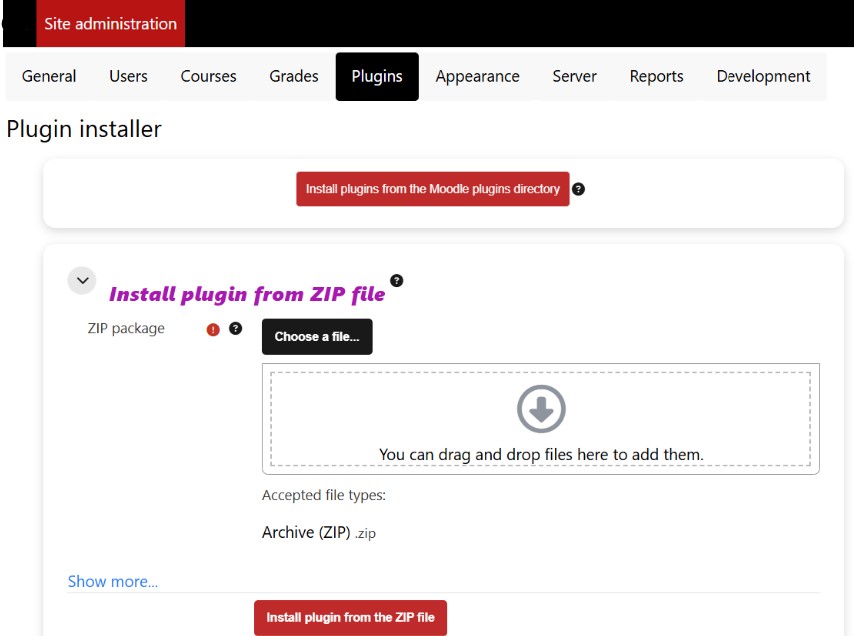
Site Administration -> Plugins -> Install plugins
Upload the ZIP file and complete the installation.
Section 3
Building your first instrument
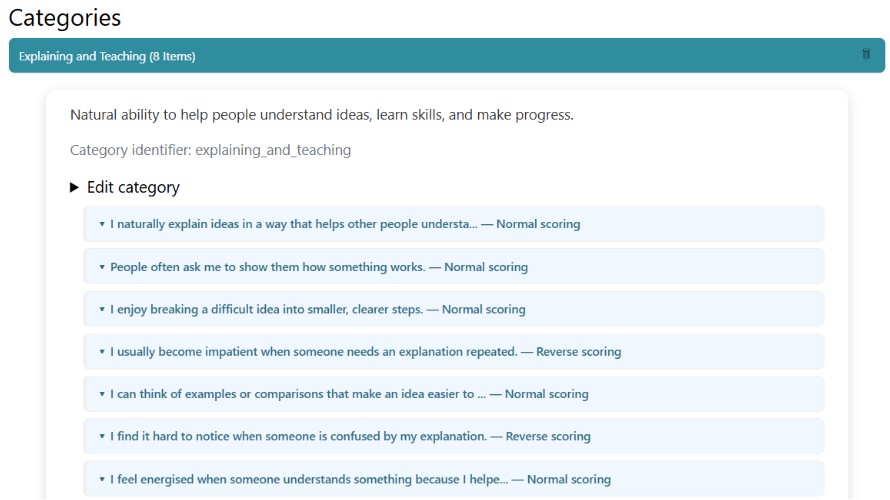
Every SelfProfile contains only four things.
-
Instructions
-
A response scale
-
Categories
-
Statements
That's all.
For example: Planning contains statements like "I organise my work before I begin." Focus contains statements like "I can usually stay focused during a study session."
Each statement belongs to exactly one category.
Section 4
The real power of SelfProfile
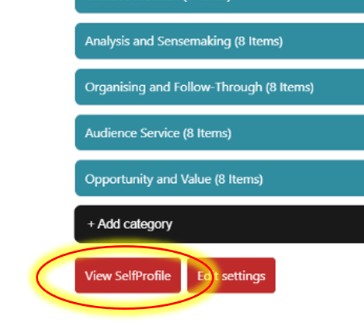
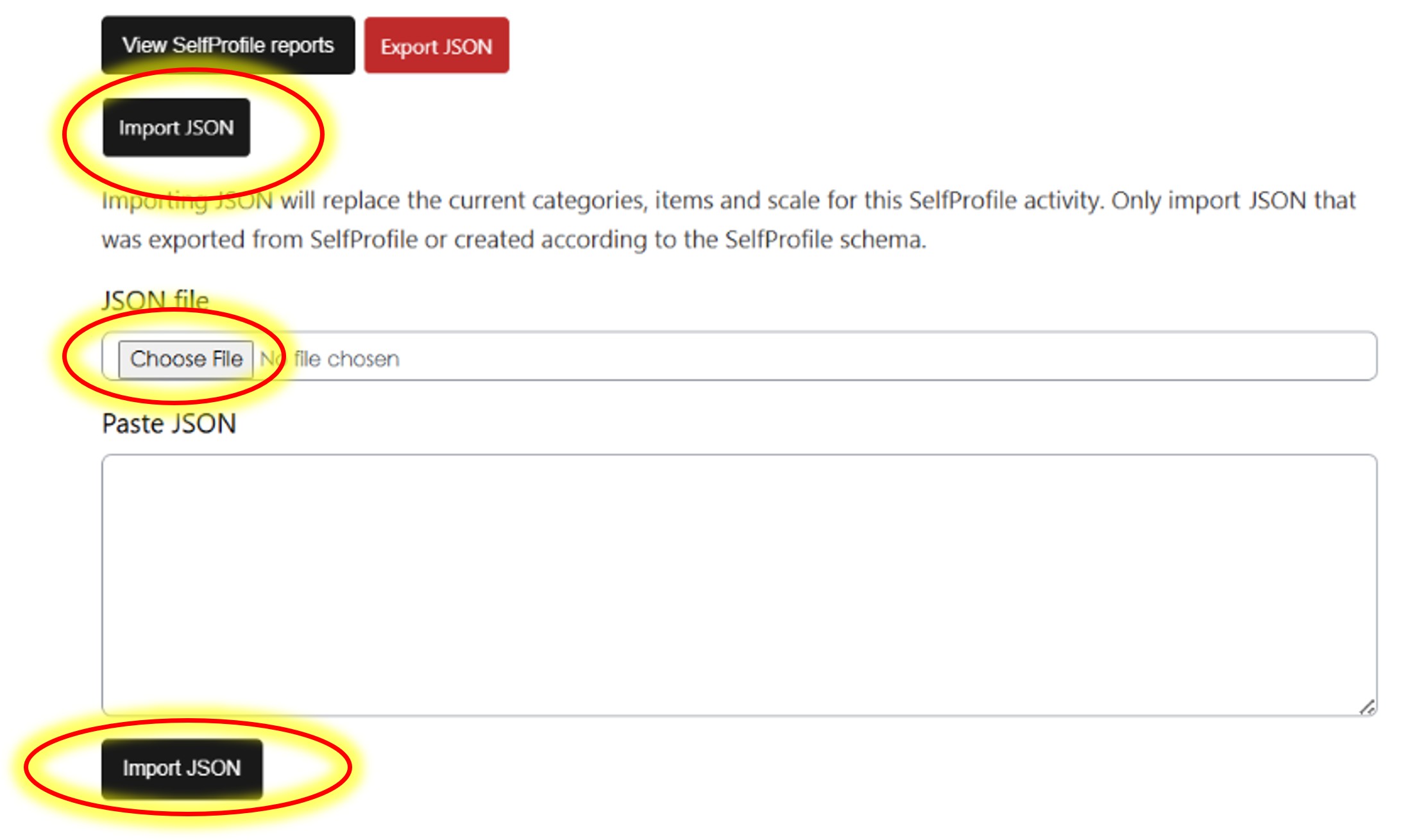
Most questionnaire builders require you to type every statement manually. SelfProfile can work like this, but it can work differently. The entire instrument can be imported as a JSON file, edited and then exported as a JSON file, to be used by other assessors.
That JSON contains
-
activity name
-
instructions
-
scale
-
categories
-
statements
-
reverse-scoring information
but never student data. This means an instrument can be created once, shared, improved, reused, and imported into another Moodle site in seconds.
Section 5
Why JSON changes everything
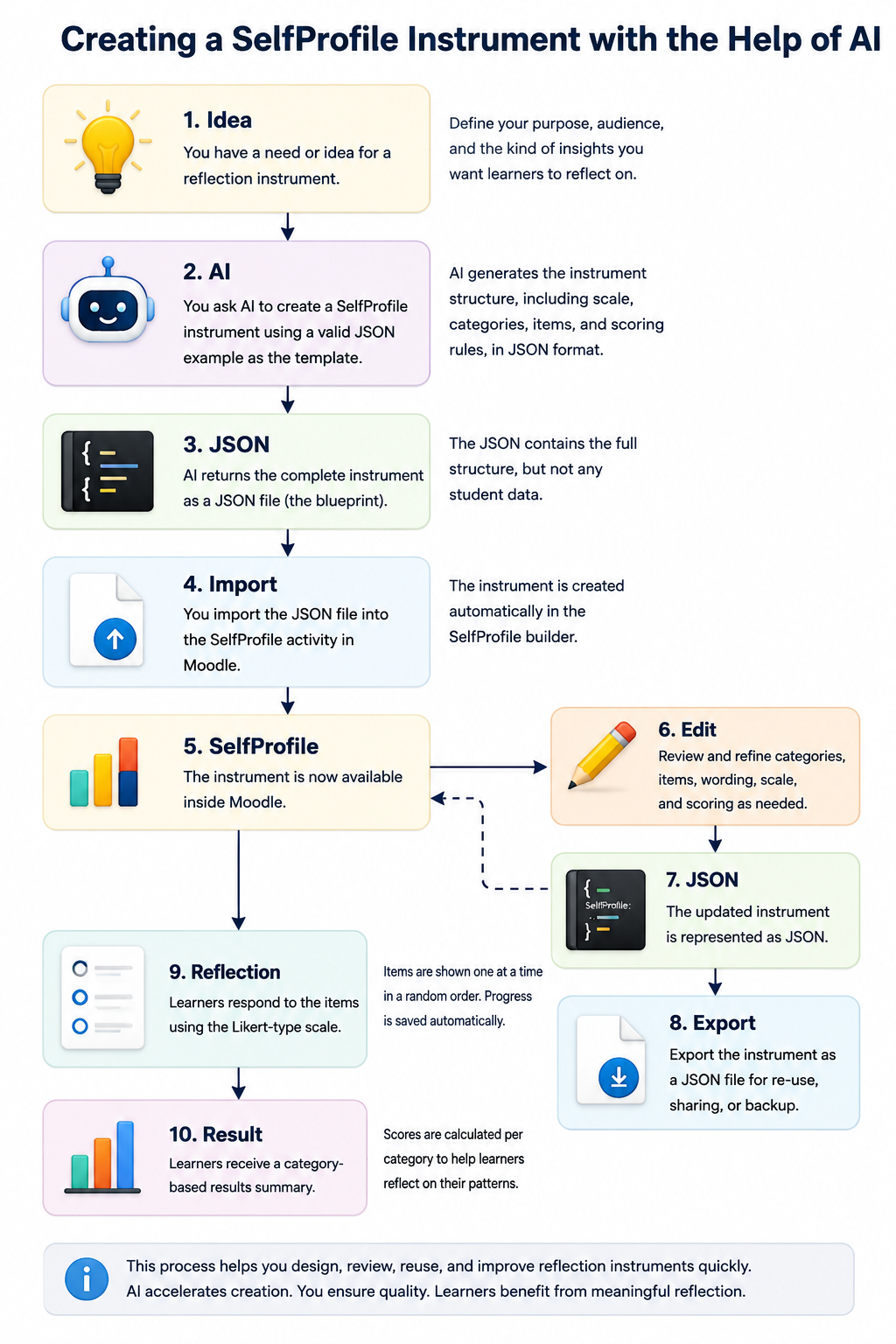
Think of JSON as the blueprint of your questionnaire. Instead of spending hours typing statements into Moodle, you can create the blueprint once.
Even better, AI can help you write it. For example, instead of writing fifty leadership statements yourself,
you could copy the sample JSON from the README.md file and ask ChatGPT:
Create a SelfProfile for volunteer leadership using the attached JSON example as the exact structure...
Within seconds AI generates a complete instrument.
You simply
-
review it,
-
improve the wording,
-
import the JSON,
-
and begin using it.
This dramatically reduces the time needed to create new reflective activities.
Section 6
Good AI prompting
The secret is not asking AI
"Create a questionnaire."
Instead, provide AI with
-
a valid exported JSON reflecting the kind of instrument you want to build. The README.md file contains a valid sample that AI will understand. Copy and paste that into your prompt. Or, prompt it with the entire README.md file.
-
the README
-
your audience
-
your topic
For example:
Use the attached SelfProfile JSON as the exact template.
Create a SelfProfile instrument for first-year engineering students on study readiness.
Keep the schema unchanged.
Return only valid JSON.
And, copy and paste the prompt below to your AI (replace the bits in yellow with your information).
Use this exact schema:
• "schema": "mod_selfprofile"
• "schemaVersion": 2
PURPOSE
Describe the purpose of the SelfProfile instrument.
AUDIENCE
Describe the learners who will complete this instrument.
CONTEXT
Describe the course, workshop, counselling process or ministry where this instrument will be used.
CREATE
[number] categories
[number] statements per category
The instrument should:
• use clear first-person statements
• contain one idea per statement
• use concise wording
• avoid double negatives
• include normal and reverse-scored items where appropriate
• avoid clinical, diagnostic or recruitment claims
IMPORTANT
Return ONLY valid JSON.
Do NOT include Markdown.
Do NOT include explanations.
Do NOT include comments.
Do NOT include code fences.
Do NOT include student responses or personal data.
Because the schema already exists, AI focuses entirely on writing better educational content rather than inventing technical structure. Below is a sample prompt. Replace the highlighted text with your own information.
Section 7
Review every AI-generated instrument
AI can generate excellent first drafts. It cannot judge whether every statement is educationally appropriate.
Always review
-
wording
-
fairness
-
cultural appropriateness
-
learner level
-
balance between positive and reverse-scored items
before using an instrument with learners.
Summary
You have learned that SelfProfile is
✓ reusable
✓ teacher-authored
✓ reflective
✓ JSON-powered
✓ AI-assisted
The plugin is therefore much more than a Moodle questionnaire.
It is a platform for creating and sharing reflective learning instruments.
Mini Activity
Before moving on, download one of the sample JSON instruments from the Resources section.
Import it into your own SelfProfile activity.
Open the Builder and explore how the instrument has been constructed.
Then ask ChatGPT to create a completely different SelfProfile instrument using that JSON as its template.