FREE MINI-COURSE · FOR MOODLE EDUCATORS
Lesson Activity in Moodle with AI
Turn a teaching idea into a working Moodle Lesson by collaborating with ChatGPT. Explore a small example, prepare your learning brief, and create, restore and test a larger Lesson for your own learners.
About this mini-course
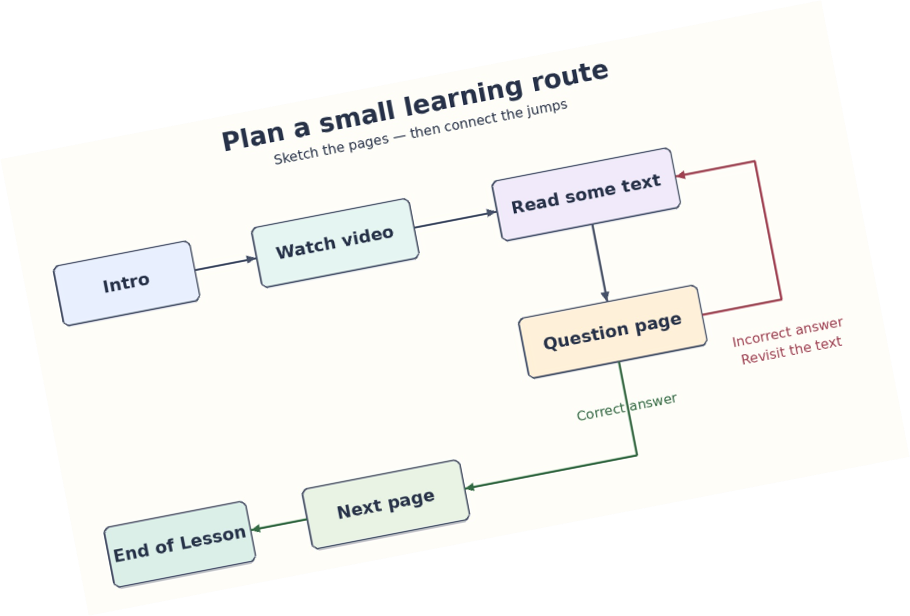
Moodle’s Lesson activity combines content, questions, feedback and different routes through learning material. Learners can make choices, answer questions and receive guidance based on their responses.
You will explore these building blocks in a small, working Lesson. You can use the supplied downloadable example or create or adapt your own. You will also practise backing up and restoring a Lesson activity.
This small example serves as a seed, or “Rosetta Stone”: a working reference that helps ChatGPT understand how a Moodle Lesson is constructed. Your target Lesson is the larger learning activity you want to create for your students.
You will give ChatGPT your learning brief and, when useful, the seed backup. You will then review the generated material, restore the resulting backup into a test course, and check the Lesson before making it available to learners.
Who is this course for?
This course is for Moodle teachers, course creators and administrators who want to create Lesson activities with assistance from ChatGPT. You should already be able to navigate a course, turn editing on and add an activity or resource. Previous Lesson experience is helpful but is not required.
For the practical work, you need a Moodle test course with permission to create activities and perform the required backup and restore operations. You also need access to a ChatGPT environment that can inspect uploaded files and create downloadable files. Tell ChatGPT which Moodle version your target course uses.
Your eight-step learning roadmap
By the end of this mini-course, you will be able to complete the following steps.
-
1Understand how a Lesson works
Explain how content pages, question pages, answers, feedback and navigation jumps shape the learner’s experience.
-
2Recognise the building blocks
Identify the available Lesson question types and explain branching, clusters and their associated navigation structures.
-
3Prepare a seed Lesson
Inspect and use the supplied seed, or create or adapt a compact example. Describe which features it demonstrates and which it does not.
-
4Choose suitable settings
Select settings for attempts, grading, progression and activity completion that support the intended learning experience.
-
5Test the seed as a learner
Follow its routes, submit correct and incorrect answers, check feedback and confirm that the Lesson reaches its intended ending.
-
6Back up, restore and verify
Create a single-activity backup without user data, restore it into a test course, and verify its content, navigation and relevant settings.
-
7Collaborate with ChatGPT
Prepare a brief covering audience, learning outcomes, sources, Moodle version and desired behaviour. Use the seed when helpful, review the proposed design and request a target Lesson backup.
-
8Restore, evaluate and refine your target Lesson
Restore the generated backup into a test course. Check accuracy, questions, feedback, navigation and settings, then work with ChatGPT to correct problems and retest.
A starting point, not a limit
A seed does not have to demonstrate every Lesson feature. ChatGPT may research Moodle documentation and source code to add features absent from the seed. Supplying another working example can help when a feature is unfamiliar or complex. Generating a backup does not establish that it works: restoration and learner testing are essential.
How you will learn
- Explore a working seed and a completed example of a target Lesson.
- Use selected Moodle Academy videos and supporting explanations.
- Use the supplied seed or build or adapt your own.
- Practise single-activity backup and restore.
- Develop your learning brief and review ChatGPT’s proposed design.
- Create, restore, test and refine your target Lesson.
You remain responsible for the learning design and final checks. ChatGPT helps interpret structures and prepare new material; your review and Moodle testing establish whether the activity is suitable for learners.
Your practical completion task
By the end, you will have:
- A seed Lesson you understand, using the supplied example or your own version.
- A seed backup without user data and a verified restored copy.
- A learning brief and an approved design for your target Lesson.
- An AI-generated target Lesson backup and a working restored activity.
- A completed review of content, questions, feedback, navigation and settings.
Success means you can guide the AI, restore the result, explain how your Lesson works and demonstrate that it supports your intended learning outcomes.